
How can I use my chartplotter to show Course to Steer?
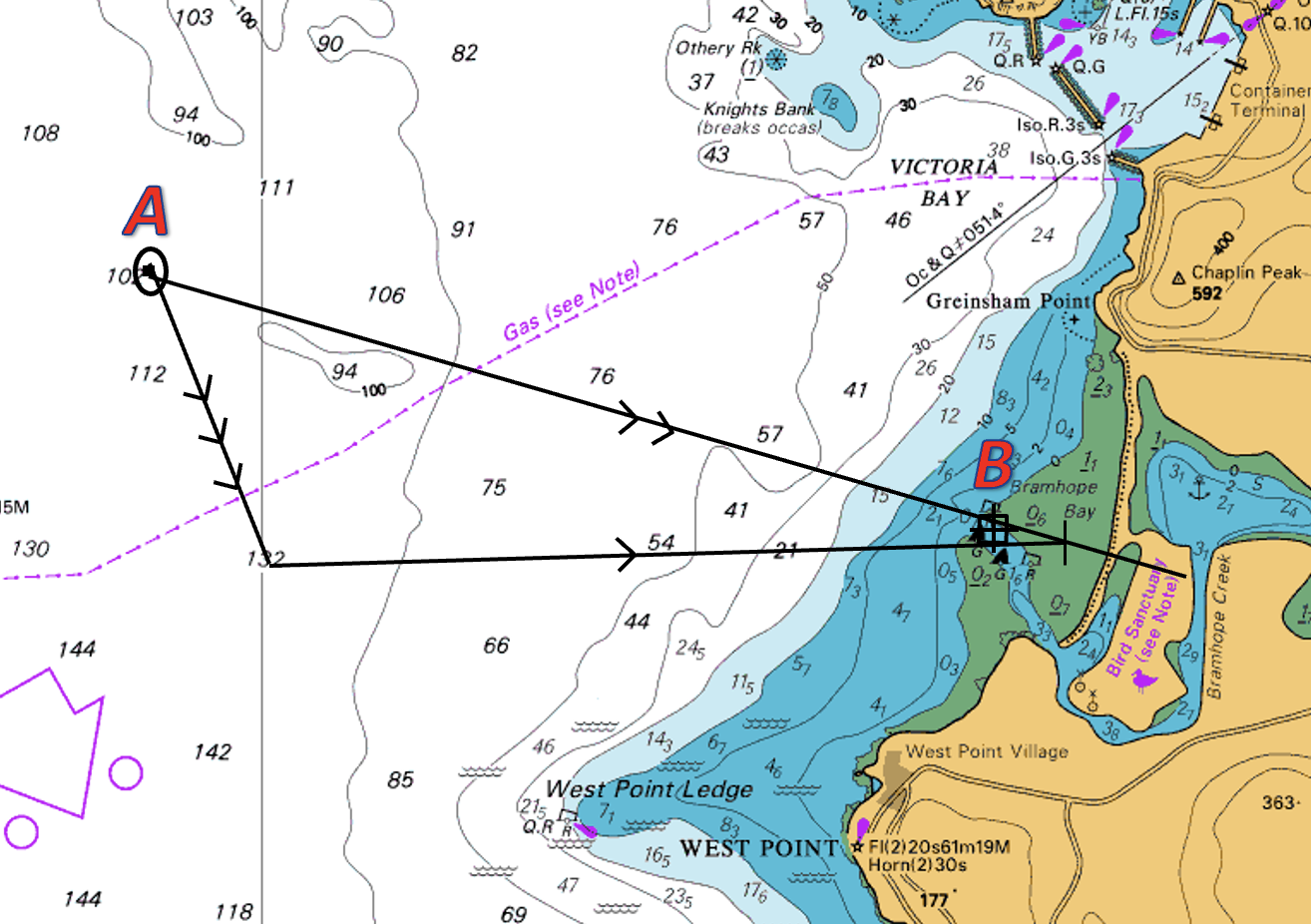
Before we get caught up in the world of electronic chart plotters, it’s worth taking a step back to consider what a course to steer is when we plot it on a paper chart. Put simply, it is a method of working out which ‘course to steer’ to allow you to navigate from point A to point B, allowing for tide and wind.
In a tidal location (or if there is any kind of decent breeze), if you were simply to point at your destination or waypoint and start motoring or sailing, you would get pushed either to port or starboard and might not make it. Although your heading (where the boat is pointing) is pointing at your waypoint, external elements such as tide or wind are pushing the boat down another track, which we refer to as your Course over the Ground or COG.
There are several steps to create a course to steer.
Plot your position fix & waypoint
Draw a line between your fix (point A) and the waypoint (point B). This is your water track or your vessels heading.
Work out and plot the tide for the duration of your course to steer. In the image to the right, this is indicated by the vector with 3 arrows.
Plot your vessel’s intended speed through the water. This is drawn from the end of your tide line to a point that intercepts your water track. Depending on the tide, it could be before or after your waypoint.
This line is your course to steer and is also your vessel’s water track. This is marked by 1 arrow. In the image above, the vessel would have to steer a compass direction which is north of the waypoint to maintain its progress along its intended water track.
Our video below demonstrates how to set a course to steer on a chart.
Now, to return to our chartplotter:
As you can see on the image below, the boat is heading almost due north along what appears to be a safe route (staying west of the west cardinal). On this plotter, the heading is marked by the black vector with 1 arrow at the end.
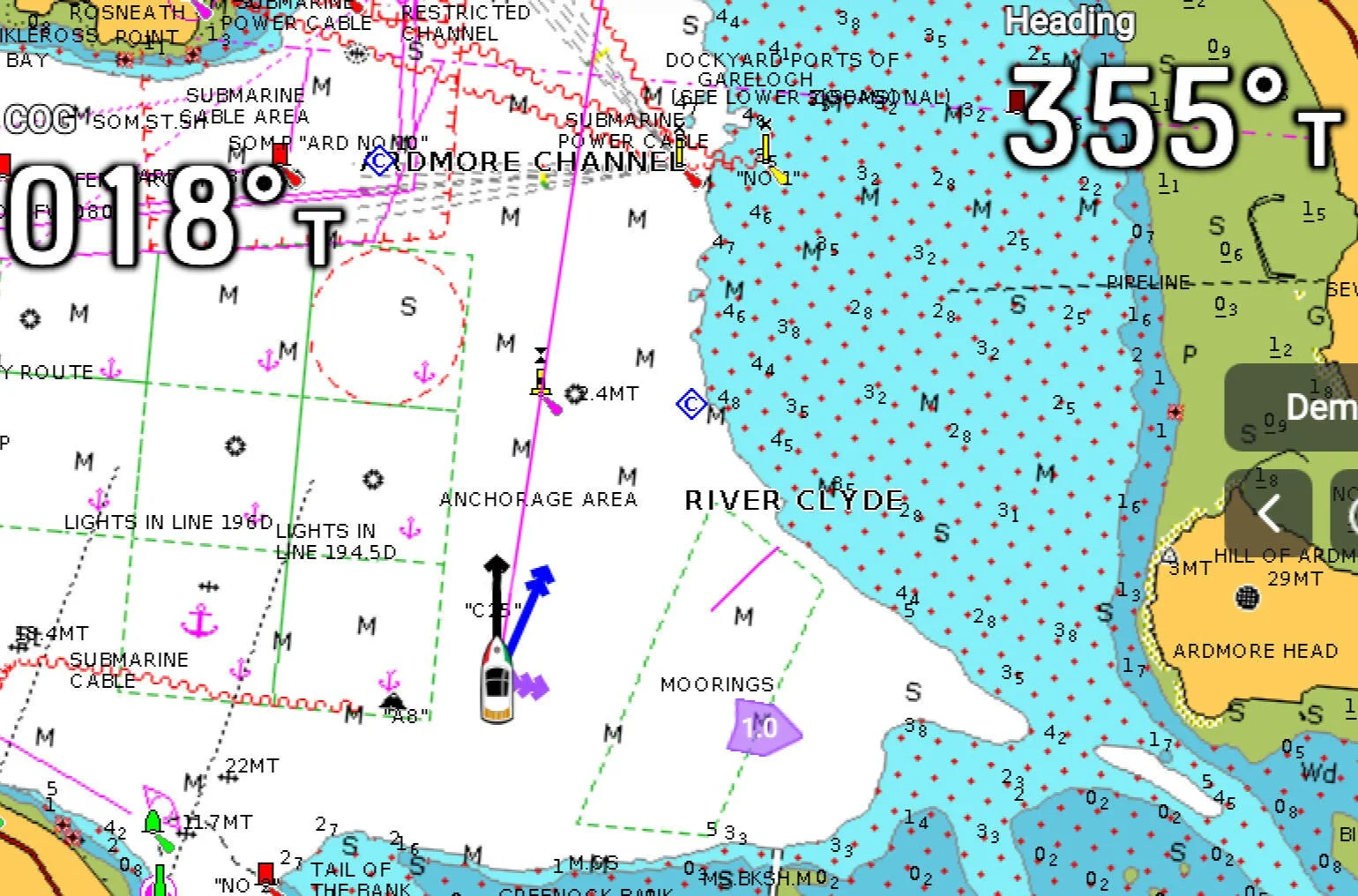
However, due to the flood tide, which the chartplotter has taken into account (indicated by the two purple arrow heads at the starboard side of the boat) and which in this case is moving left to right, the track the vessel will actually follow is marked by the blue vector with 2 arrows (course over the ground or COG)
To summarise, you need to point your COG vector (indicated by 2 arrows), at your destination or waypoint to ensure you actually get there. In the example above, the vessel is being pushed to the wrong side of the West Cardinal Mark despite appearing to be aiming to the safe side of it.
Below are a few key points to note when setting up your chart plotter to show your Course To Steer.
Have you turned on the function that allows both the heading and COG vectors to be displayed on the chart?
Are the vectors set to a suitable length? Most systems default to 6-minute vectors, which is a projection of where it thinks you will be in 6 mins. This might need to be increased depending on your location, speed (slow) of travel, or decreased for higher speed and confined waters.
Why doesn’t the plotter show my heading vector?
This could be for several reasons. In modern vessels, the most likely reason is that the tab to show the heading vector simply hasn’t been turned on. On the majority of the MFD’s (multi-function displays), there is a simple menu in the bottom left of the chart which allows multiple vectors to be turned on/off, orientation to be changed, as well as overlays to be added as required.
On older vessels, it might be the case that the vessel does not have a heading sensor or equivalent. If your vessel isn’t able to show your heading vector, then that isn’t too much of an issue. Your Course Over the Ground (ground track) is much more important as it shows where your vessel is actually heading and also gives a pretty good indication of what the external elements are doing. To summarise, your COG line needs to be pointing at your destination or waypoint.
If you would like to know more on how to set up and use your chart plotter, then we have several courses that cover that - Small Ships Nav & Radar, RYA Yachtmaster Theory, RYA Day Skipper Theory and we can also run a bespoke course in our classrooms or on your boat.
